Showing posts with label ဝင္းဒိုး. Show all posts
Showing posts with label ဝင္းဒိုး. Show all posts
Saturday, November 10, 2012


Thursday, September 20, 2012
Windows 7 ISO x86 and x64 Official Direct Download Links (Ultimate, Professional and Home Premium)
ဝင္းဒိုး7 လင့္ခ္ေတြ ဆိုဒ္ထဲမွာအတန္အသင့္လံုေလာက္ျပီးလို႕ ထင္မိတယ္။ဒီတခါ Single Links ေတြေတြ႕လို႕ေနာက္ဆံုး ျပန္ျပီးတင္ေပးလိုက္ပါတယ္။ေနာင္ဆို ၇ွိေနခဲ့သည့္ လင့္ခ္ေတြ အဆင္မေျပခဲ့မွ ျပန္ျပင္ျပီး တင္သြားပါေတာ့မယ္။ အဆင္မေျပခဲ့ရင္ က်ေနာ့ကို ျပန္ေျပာၾကေပါ့ဗ်ာ... အားလံုးအဆင္ေျပပါေစ။

windows 7 Official Download Links
Windows XP Pro SP3 Genuine Bootable ISO - 32 Bit + Genuine Serial Key

100% Genuine Untouched And Bootable
Windows XP Pro SP3 Genuine Bootable ISO - 32 Bit (SINGLE LINK)


Windows XP Professional SP3 32-bit -Black Edition September 2012

Windows XP Professional SP3 32-bit -Black Edition 2012.9.12
ေမးလ္ထဲက သူငယ္ခ်င္းတေယာက္ေပးရွာခိုင္းလို႕ သူ႕အတြက္လုပ္ေပးရင္း ဒီမွာတင္လိုက္ပါတယ္ :P
အသံုးလိုသူေတြအတြက္ ဆြဲသြားေပါ့ဗ်ာ..က်ေနာ္လည္း ဆြဲလာခဲ့တာဘဲ.. ဟက္က္ :P
အဆင္ေျပပါေစ
For questions and bug reports go
to http://www.zone54.com You can Support this project by making a donation or by clicking
1-4 times through the website and then once on a banner ad.
SHORT INFORMATION ABOUT THIS WINDOWS XP. This Windows XP includes all the latest
Windows XP updates with over
200 MB additional CPU, LAN, WLAN, and SATA/AHCI drivers. This Windows XP is updatable and there no Windows XP Activation or Crack needed, A CD-Key and all the other user required inputs during the Windows XP installation will be filled in automatically. This Windows XP has also a few
Tuesday, September 4, 2012
Windows 7 Home Premium x86 with Sp1 Original

 |
This Is Original Version of Windows 7 Home Premium x86 With Server pack 1
This The hash of the windows file : Hash : 6071B4553FCF0EA53D589A846B5AE76743DD68FC
Saturday, August 25, 2012
Windows 7 Ultimate SP1 x86x64 Integrated July 2012

ေနာက္ဆံုးထြက္ေလးပါ.
Windows 7 Ultimate SP1 32bit Part 1 (0.97GB)
Windows 7 Ultimate SP1 32bit Part 2 (0.97GB)
Windows 7 Ultimate SP1 32bit Part 3 (720.30MB)
Windows 7 Ultimate SP1 64bit Part 1 (0.97GB)
Windows 7 Ultimate SP1 64bit Part 2 (0.97GB)
Windows 7 Ultimate SP1 64bit Part 3 (0.97GB)
Windows 7 Ultimate SP1 64bit Part 4 (690.33MB)
Password : www.p30day.com
Windows 8 RTM Enterprise 32bit and 64bit


[ System Requirements ]
- Processor: 1 gigahertz (GHz) or higher.
- RAM: 1 gigabyte (GB) 32-bit or 2 GB for 64-bit version.
- Free space on hard drive: 16 gigabytes (GB) 32-bit or 20 GB for 64-bit version.
- Graphics: graphics device Microsoft DirectX 9 with the driver WDDM.
- To use the touch capabilities want a tablet or a monitor that supports multi-touch technology.
- To access the Shop Windows to boot and run applications that require an active Internet connection and a screen resolution of 1024 x 768 pixels.
- To bind the application requires a screen resolution of at least 1366 x 768 pixels.
- Internet access (fees may apply by your ISP).
Friday, August 24, 2012
Windows 8 KMS Activator v1.5.1 Aaron7pm-NiCkkkDoN

Windows 8 KMS Activator v1.5.1 Aaron7pm-NiCkkkDoN
Activates Windows 8 via KMS activation. Activation
lasts for 180 days, after 180 days simply run the program again.
Features:
Friday, August 17, 2012
Download Original Windows 7 SP1 iso - Full Version
 Sesuai Dengan Perkembangan OS Windows 7 Sekarang makin banyak di gemari oleh para user, kali ini SIAF-ACEH.COM share link download Original Windows 7 SP1 ISO 32bit dam 64 Bit. Jika
 Anda tidak perlu lagi membeli CD windows 7, disini saya akan memberikan link
Jika anda mau download silahkan Pada Link Yang Saya Sediakan Di Bawah Ini. :
1. Download Windows 7 Service Pack 1 ISO (SP1):
- Windows 7 Home Premium with SP1 32-bit
- Windows 7 Home Premium with SP1 64-bit
- Windows 7 Professional with SP1 32-bit
- Windows 7 Professional with SP1 64-bit
- Windows 7 Ultimate with SP1 32-bit
- Windows 7 Ultimate with SP1 64-bit
2. Download Windows 7 Non-SP1:
- Windows 7 Home Premium 32-bit
- Windows 7 Home Premium 64-bit
- Windows 7 Professional 32-bit
- Windows 7 Professional 64-bit
Windows 7 AIO SP1 x86 Integrated March 2012 English

Windows 7 AIO SP1 x86 Integrated March 2012 English - Build is not crammed with various third-party resource clearance. There were only 20 original local integrated package. After installation, you get no different in functionality from the original distribution product. Integrated update on 19.03.2012, including the Windows Internet Explorer 9, Microsoft. NET Framework Client Profile 4 and KB971033
Thursday, August 9, 2012
Windows 7 SP 1 တြင္ Language Pack ခ်ိန္းျပီး သံုးခ်င္သူမ်ား အတြက္

ကၽြန္ေတာ္ ဒီေန႕ေတာ့ Windows 7 SP1 ကို Language Pack ခ်ိန္းျပီး အသံုးျပဳခ်င္ သူမ်ားအတြက္ နည္းလမ္းေလးကို ျပန္ျပီးေတာ့ မွ်ေ၀ေပး သြားမွာ ျဖစ္ပါတယ္ .. အရင္တုန္းကေတာ့ ေရးေပး ထားတာ ရွိပါတယ္ .. အခု SP 1 အတြက္ Language Pack ခ်ိန္းလို႕ရသြားျပီ ျဖစ္တဲ့အတြက္ အသစ္ထပ္ေရးေပး သြားမွာ ျဖစ္ပါတယ္ .. ကၽြန္ေတာ္တို႕ အေနနဲ႕ ႏိုင္ငံ ရပ္ျခားမွာ ေရာက္ေနတဲ့ အခါမွာ အမ်ားစု Laptop ေတြ၀ယ္ ၾကတဲ့ အခါမွာ သူတို႕ ႏိုင္ငံေတြရဲ႕ Language ေတြနဲ႕ Windows ေတြကို တင္ေပးလိုက္ၾကပါတယ္ .. အဂၤလိပ္လို အသံုးျပဳတဲ့ ႏိုင္ငံေတြက ၀ယ္လိုက္တာ ဆိုရင္ေတာ့ ျပသနာ မရွိေပမယ့္ ဥပမာ ၊ ဂ်ပန္တို႕ ၊ တရုတ္တို႕ ၊ ရုရွားတို႕ ကေန ၀ယ္မယ္ဆိုရင္ သူတို႕ရဲ႕ Language နဲ႕ Windows ကိုသာ အသံုးျပဳရမွာ ျဖစ္ပါတယ္ .. အဲ့ဒီအခါမွာ ကၽြန္ေတာ္တို႕ အေနနဲ႕ Orginal Windows ကိုလည္း မျဖဳတ္ခ်င္ဘူး English လိုလည္း အသံုးျပဳခ်င္တယ္ ဆိုရင္ အခု ကၽြန္ေတာ္ ေရးေပးသြားမဲ့ နည္းလမ္းေလး အတိုင္း Language Pack ခ်ိန္းျပီး အသံုးျပဳႏိုင္မွာ ျဖစ္ပါတယ္ ..
ကၽြန္ေတာ္ တို႕ Vistalizator ဆိုတဲ့ ေကာင္ေလးကို သံုးျပီး ေဆာင္ရြက္မွာ ျဖစ္ပါတယ္ .. Vistalizator ကို ဒီေအာက္မွာ ေပးထားတဲ့ ဆိုဒ္ေလးမွာ သြားျပီးေတာ့ လည္း ေဒါင္းေလာ့ ခ်ႏိုင္ပါတယ္ .. ကၽြန္ေတာ္ အဆင္ေျပေအာင္ ေအာက္မွာလည္း တင္ေပးထားတာ ရွိပါတယ္ ..
Vistalizor ေလးကို ေဒါင္းေလာ့ ခ်ျပီးသြားျပီ ဆိုရင္ေတာ့ ကၽြန္ေတာ္တို႕ Language Pack ခ်ိန္းခ်င္တဲ့ Language အတြက္ Language Pack ကို Windows 7 SP 1 အတြက္ ဒီေအာက္ကလင့္မွာ တင္ေပးထားပါတယ္ .. သြားျပီးေတာ့ ေဒါင္းေလာ့ခ်လိုက္ပါ .. ေဒါင္းေလာ့ခ်တဲ့ အခါမွာ မိမိတို႕ရဲ႕ Windows Version အလိုက္ 32 Bits နဲ႕ 64 Bits ဆိုျပီး ခြဲတင္ေပးထားတာ ျဖစ္ပါတယ္ .. မိမိတို႕ အသံုးျပဳေနတဲ့ Windows Version ေအာက္မွာ တင္ေပးထားတဲ့ Language Pack ကို ေဒါင္းေလာ့ ခ်လိုက္ပါ ..

ကၽြန္ေတာ္ ေအာက္မွာေတာ့ Windows 7 English Language Pack ( 64 Bits ) ကိုတင္ေပးထားပါတယ္ ..
Vistalizator ေရာ Language Pack ေရာ ေဒါင္းေလာ့ ခ်ျပီးသြားျပီ ဆိုရင္ေတာ့ Language Pack စျပီးခ်ိန္း ၾကရေအာင္ဗ်ာ .. ဒီအဆင့္မွာ အမ်ားစု ၾကံဳရတာေလး တစ္ခုကို ေျပာျပ ခ်င္ပါတယ္ .. Vistalizator ကို ဖြင့္လိုက္တဲ့ အခါမွာ ေအာက္က ပံုမွာ ျပထားသလို Error Code ေလး တက္လာတာကို ၾကံဳဖူးတဲ့ သူမ်ား ရွိပါလိမ့္မယ္ ..

အေပၚက ျပထားတဲ့ Error မ်ိဳး ၾကံဳလာရျပီ ဆိုရင္ေတာ့ ေအာက္မွာ ျပထားတဲ့ အဆင့္ေလးေတြ အတိုင္း Vistalizator ကို Compatiblity မွာ အျမင့္ဆံုး OS ကို ေျပာင္းေပးလိုက္ပါ .. မိမိတို႕စက္မွာ Windows 7 ကအျမင့္ဆံုး ဆိုရင္ Windows 7 ကိုေျပာင္းလိုက္ပါ .. ျပီးရင္ေတာ့ Apply >> OK ေပးလိုက္ယံုပါပဲ ..


အေပၚက အဆင့္ေတြ အတိုင္း ေျပာင္းျပီးသြားလို႕ Error မတက္ေတာ့ ဘူးဆိုရင္ Vistalizator ကို Run လိုက္ပါ .. ျပီးရင္ ေအာက္ကပံုမွာ ျပထားတဲ့ အတိုင္း မိမိတို႕ ခ်ိန္းခ်င္တဲ့ Language Pack ကိုယူလိုက္ပါ ..

အေပၚက ပံုမွာ ျပထားတဲ့ အတိုင္း Add Languages မွတစ္ဆင့္ မိမိတို႕ အသံုးျပဳခ်င္တဲ့ Language Patch File ကိုေရြးခ်ယ္လိုက္ပါ .. ဒါဆိုရင္ ေအာက္ကပံုမွာ ျပထားတဲ့အတိုင္း Run ေနပါလိမ့္မယ္ .. ခဏ ေစာင့္ေပးလိုက္ပါ ..

အပၚက အဆင့္ေတြ အတိုင္း ျပီးသြားျပီ ဆိုရင္ေတာ့ ေအာက္မွာ ျပထားတဲ့ ပံုအတိုင္း ေပၚလာပါလိမ့္မယ္ .. ေအာက္ကပံုအတိုင္း ေပၚလာျပီ ဆိုရင္ေတာ့ မိမိတို႕ ေျပာင္းခ်င္တဲ့ Language Pack File ကို Double Click ေပးလိုက္ပါ
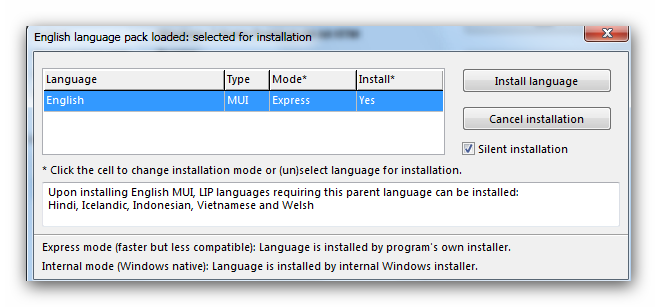
ဒါဆိုရင္ ေအာက္က ပံုမွာ ျပထားတဲ့ အတိုင္း Waring Box ေလး ေပၚလာပါလိမ့္မယ္ .. OK ေပးလိုက္ပါ .. ျပီးရင္ေတာ့ မိမိတို႕ အသံုးျပဳခ်င္တဲ့ Language Pack File ကို စတင္ျပီး Install လုပ္ေနပါလိမ့္မယ္ ..


အေပၚက အဆင့္အတိုင္း ေပၚလာျပီးလို႕ OK ေပးျပီးသြားျပီ ဆိုရင္ေတာ့ ေအာက္ပံုမွာ ျပထားတဲ့အတိုင္း Change Language ကိုႏွိပ္ျပီး မိမိတို႕ အသံုးျပဳခ်င္တဲ့ Language Pack ကို ခ်ိန္းေပးလိုက္ပါ ..


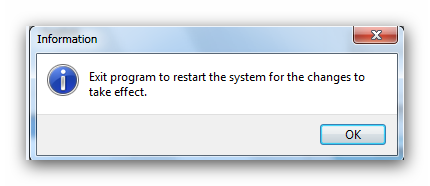
အေပၚက ေပၚမွာ ျပထားတဲ့ အတိုင္း Information Box ေလးေပၚလာျပီ ဆိုရင္ေတာ့ OK ေပးလိုက္ျပီး ေအာက္မွာ ျပထားတဲ့ အတိုင္း Vistalizator ေလးကို Exit ေပးလိုက္ပါ ..

ေအာက္ကပံုအတိုင္း Confirm Box ေလးေပၚလာျပီ ဆိုရင္ေတာ့ Yes ကိုေပးလိုက္ပါ .. ဒါဆိုရင္ Restart က်သြားပါလိမ့္မယ္ .. Windows ျပန္တက္လာျပီ ဆိုရင္ေတာ့ မိမိတို႕ Windows က Language Pack ခ်ိန္းျပီးသြားတာ ေတြ႕ရပါလိမ့္မယ္ ..

ဒီေလာက္ ဆိုရင္ေတာ့ အားလံုးပဲ Windows 7 SP 1 မွာ Language Pack ခ်ိန္းတက္သြားမယ္လို႕ ထင္ပါတယ္ ..
ဒီပို႔စ္ေလးကို PDF FILE ျဖင့္ လိုခ်င္တယ္ ဆိုရင္ ေအာက္မွာ ယူလိုက္ပါ ..
အားလံုးပဲ အဆင္ေျပၾကပါေစ .. ေက်းဇူးတင္ပါတယ္ခင္ဗ်ာ ..
Wednesday, August 8, 2012
Windows 8 Loader For Activation

Windows 8 Loader တင္ေပးလိုက္ပါတယ္။ Windows 8 အသံုးၿပဳတဲ့သူေတြအတြက္
အသံုးဝင္မယ္ထင္ပါတယ္။ လိုအပ္ရင္ေတာ့ေအာက္မွာေဒါင္းသြားလိုက္ပါ ......
Changes in version:
• Logging feature
• Everything could be done in Normal Mode now
• Credits updated
• No more freezing window during activation or refresh
• Enabling hidden features now displays message after completion
• Timebomb restore fixed
Download Link :
mediafire | zippyshare | minus 

Subscribe to:
Posts (Atom)
Popular Posts
-
 Windows Phone အသံုးျပဳသူေတြ Windows Phone ေပၚကေန ဓာတ္ပံုေတြ၊ ဗီဒီယိုဖိုင္ေတြကို Text Message ေပၚကေန သင့္သူငယ္ခ်င္းအေပါင္းအသင္းေတြဆီ...
 -
 YouWave Android Home 4.0.2 crack Playing with the Android emulator on your computer is a pretty geeky endeavor, but YouWave mak...
 -
Windows Phone အသံုးျပဳတဲ့သူေတြအတြက္ သူငယ္ခ်င္းတို႔အသံုးျပဳတဲ့ PCနဲ႔ Windows Phone ကို ခ်ိတ္ဆက္ဖို႔ အတြက္ ဒီအတိုင္းခ်ိတ္ဆက္တယ္ဆိုရင္ ဘယ...
-
 Software ကို Install ျပီးရင္ ေပးထားတဲ့ Patch ဖိုင္ copy ယူ C/Program Files/CyberLink/PowerDVD13 ထဲ paste ခ်ပါ။ patch ...
 -
A lot of people thought that if Windows Phone 7 failed to make an impact in the smartphone market, this might spell the end of Microsoft’s ...
-
 mediafire RarPassword : phonemyintkyaw Windows 8 သမားအတြက္ အဆင္ေျပဆံုး Activator တခုလို႕ေျပာရမွာပဲ။တျခား Activator နဲ႕အဆ...
 -
 Nokia X, X+ and XL မ်ားကို root ေဖာက္ျခင္း Play Store & Google Now Launcher ထည္ ့ၾကမယ္ နန္းက်ဘုရင္ nokia ရဲ ့တစ္ေက်ာ္ ့ျပန္ခရီးဆိ...
 -
Download Manager Download Bazar Fast Download Manager Loader Droid Easy download manag...
-
 WinDriver Ghost Enterprise Edition v3.02.2996 Multilingual Incl Serial


